Merge
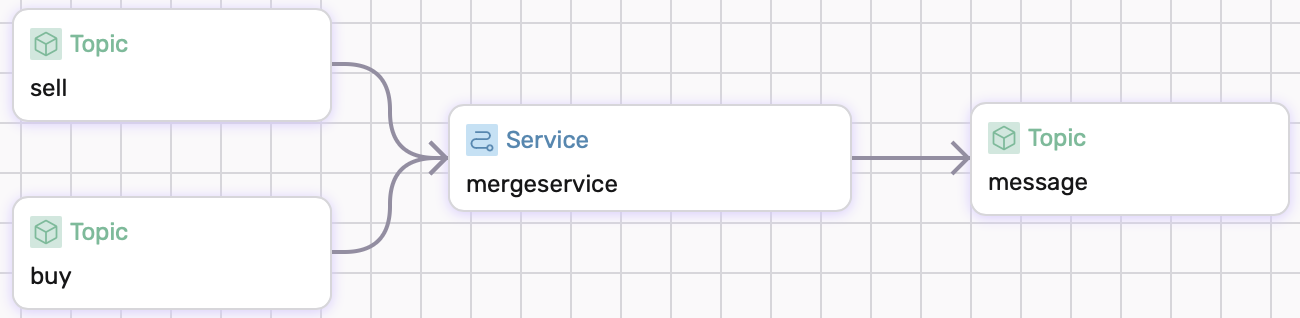
Services in fluvio can be defined to have multiple sinks and sources. In this example, we will implement a service that takes in multiple sources via a merge. The example will simulate buying and selling stocks. There is a topic buy and another topic sell that aggreate to create a log of buy and sell orders. The visual shows the dataflow we will implement.
Prerequisites
This guide uses local Fluvio cluster. If you need to install it, please follow the instructions at here.
Transformation
We can add a transform operator to our source list.
source:
  - type: topic
    id: (...)
    transforms:
      - operator: map
        run: |
          (... filter function ...)
    (... more topics ...)
In our case, we have two topics buy and sell that read json objects that include a name, amount, and price. We will map the json object into a string that gets sent into the topic message which will log the orders.
sources:
  - type: topic
    id: buy
    transforms:
      - operator: map
        run: |
          fn buy_order(order: Order) -> Result<String> {
            Ok(format!("+ Buy Order for  {}x{} at {}",order.name,order.amount,order.price))
          }
  - type: topic
    id: sell
    transforms:
      - operator: map
        run: |
          fn sell_order(order: Order) -> Result<String> {
            Ok(format!("- Sell Order for {}x{} at {}",order.name,order.amount,order.price))
          }
Running the Example
Copy and paste following config and save it as dataflow.yaml.
# dataflow.yaml
apiVersion: 0.5.0
meta:
  name: merge-example
  version: 0.1.0
  namespace: examples

config:
  converter: json

types:
  order:
    type: object
    properties:
      name:
        type: string
      amount:
        type: u32
      price:
        type: f32

topics:
  buy:
    schema:
      value:
        type: order
  sell:
    schema:
      value:
        type: order
  message:
    schema:
      value:
        type: string

services:
  mergeservice:
    sources:
      - type: topic
        id: buy
        transforms:
          - operator: map
            run: |
              fn buy_order(order: Order) -> Result<String> {
                Ok(format!("+ Buy Order for  {}x{} at {}",order.name,order.amount,order.price))
              }
      - type: topic
        id: sell
        transforms:
          - operator: map
            run: |
              fn sell_order(order: Order) -> Result<String> {
                Ok(format!("- Sell Order for {}x{} at {}",order.name,order.amount,order.price))
              }
    sinks:
      - type: topic
        id: message
To run example:
$ sdf run
Produce json objects to each of the topics:
$ echo '{"name":"AMZN","amount":20,"price":173.33}' | fluvio produce buy
$ echo '{"name":"TSLA","amount":20,"price":219.41}' | fluvio produce sell
Consume topic message to retrieve the result:
$ fluvio consume message -Bd
"+ Buy Order for  AMZNx20 at 173.33"
"- Sell Order for TSLAx20 at 219.41"
Both the buy order and sell order has been mapped into a string to be logged.
Cleanup
Exit sdf terminal and clean-up. The --force flag removes the topics:
$ sdf clean --force
Conclusion
In this example, we covered how to use merge to allow services to consume multiple sources.